For aEM tech leads and architects on AEM 6.5
Migrate AEM 6.5 to AEM as a Cloud Service
To migrate AEM 6.5 to AEM as a Cloud Service with Surge Migrate, scan your code and BPA report in the browser, turn the findings into a reviewed Migration Blueprint, then merge the fixes as small pull requests that a senior AEM engineer has approved. The scan is free; the portal is free for your first 3 months.
The problem
A Cloud Service move is mostly the same mechanical change repeated across hundreds of files: removed APIs, admin sessions, OSGi configuration formats, schedulers and dispatcher rules. The hard part is knowing exactly how much of it there is before anyone commits to a date, and then doing it without breaking the build.
What to know first
AEM as a Cloud Service is not a newer version you install: Adobe runs it and updates it continuously, and every deployment goes through Cloud Manager, which rejects code that uses removed APIs or patterns the cloud does not allow. That is why a migration starts with an exact inventory of those uses. Adobe Managed Services support for AEM 6.5 ended on 31 August 2026, and core support for AEM 6.5 on-premise ends on 28 February 2027.
How to do it in Surge Migrate
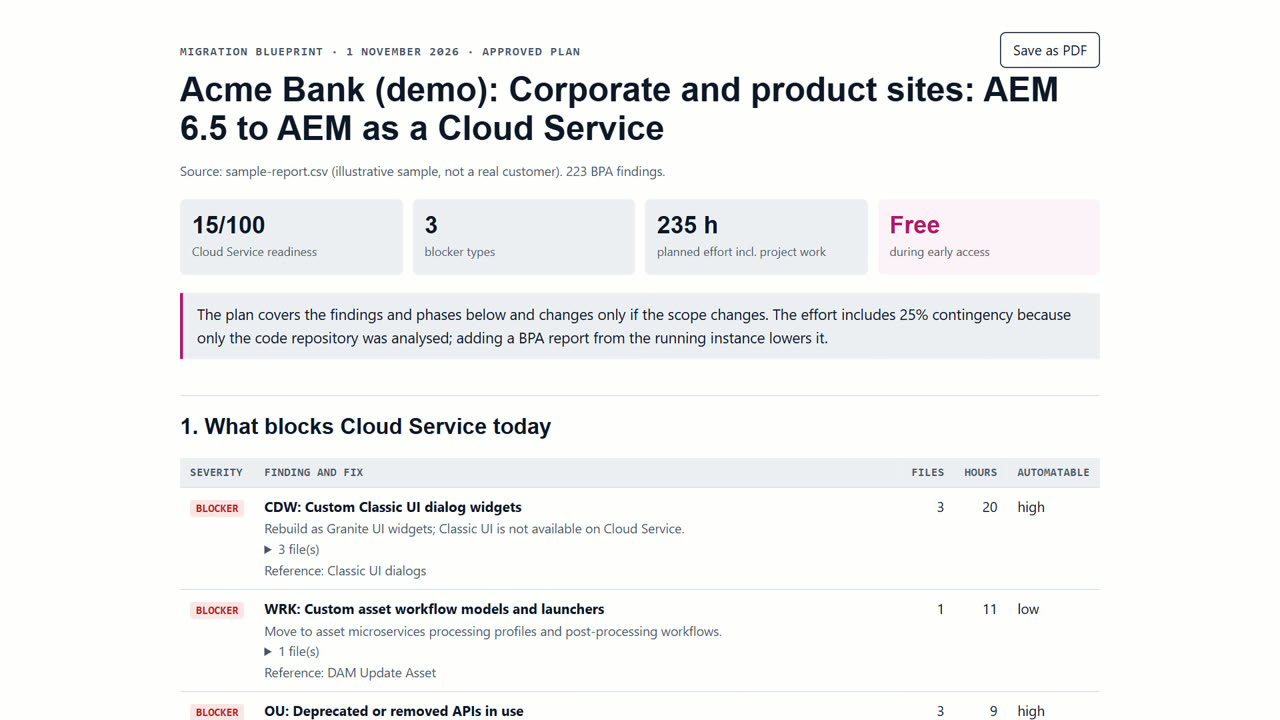
- Run the free readiness scan. Open the readiness scan and drop your Best Practices Analyzer CSV or a zip of your repository. It is read in your browser and nothing is uploaded. In a few minutes you see a readiness score, every blocker with file, line, fix and how automatable it is, and an effort range in engineer-weeks.
- Create your free account and a project. Press Start free, enter your work email and open the one-time link (there is no password). Name your workspace, then start a project and pick the service and how you want to work. Your first 3 months are free.
- Create the Migration Blueprint. Add the scan to the project and press Create Blueprint. You get phases, effort in hours, risks and the decisions your team must make. Our engineers review and approve it; open it in the browser, save it as PDF or publish it to Confluence.
- Decide what only your team can decide. The Blueprint lists decisions, for example whether to replace AEM Communities or rebuild a site on Edge Delivery Services. Approve or reject each in the portal; every decision is recorded in the audit trail.
- Review and merge the pull requests. Connect GitLab, Bitbucket Cloud or Azure DevOps with an access token. Fixes arrive as small pull requests, one pattern at a time, each approved by a senior AEM engineer. Your team merges and Cloud Manager verifies the build.
- Track phases until go-live. The delivery plan in the project shows each phase, its status and notes. After go-live, Deprecation Watch can re-scan the repository on push or nightly so new removals don't break your pipeline.
What you get
- A blocker list with file and line, before any work starts
- A Blueprint your budget holders can approve
- Pull requests per pattern, each approved by a named engineer
- A hash-chained audit trail of every scan, AI call and approval
When Surge Migrate is not the right tool
Surge Migrate is not the right tool if you are moving off AEM altogether, if you need a full redesign at the same time (a design agency fits better), or if your estate is a single small site your team can move in a few days with Adobe's free tools.
Questions
How long does an AEM 6.5 to Cloud Service migration take?
It depends on the estate. The scan gives an effort range in engineer-weeks for both a manual and an agent-assisted approach, and the Blueprint turns it into phases.
Is my code uploaded for the scan?
No. The scan reads your zip or CSV in the browser; only findings, file paths and line numbers are saved if you add the scan to a project.
Can we keep our current AEM partner?
Yes. Pull requests land in your repository and you can invite your partner to the workspace to review them.
Read next
- Check whether your AEM 6.5 code is ready for Cloud Service
- Get a fixed-scope AEM migration plan for budget approval
- The AEM 6.5 to Cloud Service migration checklist
- AEM 6.5 LTS or AEM as a Cloud Service: how to choose
- Surge Migrate vs a large systems integrator
- Pricing: free for 3 months, then at cost
Try it on your own code
The readiness scan is free and needs no account. The portal is free for your first 3 months.
Last updated 1 November 2026 · by Venu Gopal Reddy Muvva, founder