For digital and IT managers preparing a budget
Estimate the effort and cost of an AEM 6.5 migration
Surge Migrate estimates an AEM migration from your own code rather than from a questionnaire: the free scan counts every blocker and adds up hours per finding into an engineer-week range, and the Blueprint turns that into phases you can price. Without files, 8 questions give a first estimate.
The problem
Migration quotes vary widely because each partner estimates differently and rarely shows the counting behind the number. Budget holders want to see why a migration takes twelve weeks rather than six.
What to know first
Most of the effort in an AEM 6.5 to Cloud Service move is not the content copy; it is the code and configuration that Cloud Service does not accept. Each finding type has a typical cost: a removed API used in fifty files is mostly mechanical, while a custom authentication handler or a custom DAM workflow needs design work. Counting findings first, and pricing each type separately, is what makes an estimate explainable to a budget holder.
How to do it in Surge Migrate
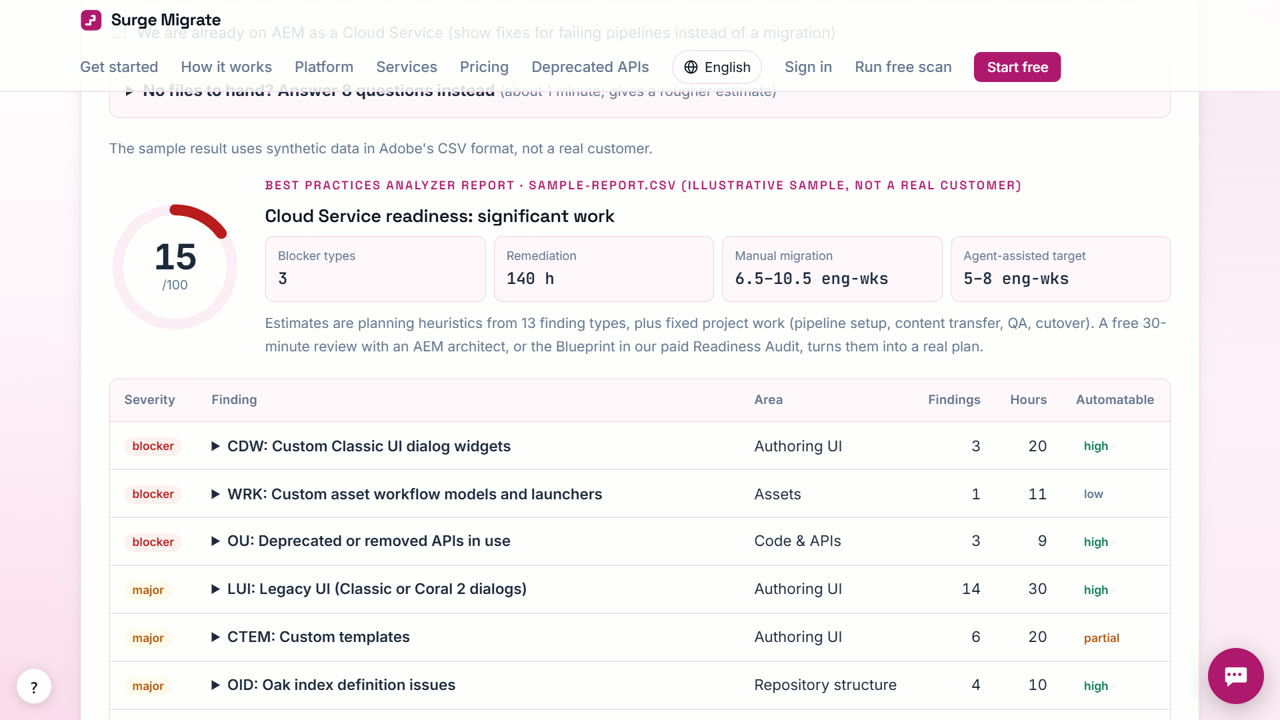
- Run the free readiness scan. Open the readiness scan and drop your Best Practices Analyzer CSV or a zip of your repository. It is read in your browser and nothing is uploaded. In a few minutes you see a readiness score, every blocker with file, line, fix and how automatable it is, and an effort range in engineer-weeks.
- Compare manual and agent-assisted effort. The scan shows two ranges: the effort with a conventional manual approach and with agents doing the pattern-based changes. Both come from the same per-finding hours, so the difference is visible.
- Create your free account and a project. Press Start free, enter your work email and open the one-time link (there is no password). Name your workspace, then start a project and pick the service and how you want to work. Your first 3 months are free.
- Create the Migration Blueprint. Add the scan to the project and press Create Blueprint. You get phases, effort in hours, risks and the decisions your team must make. Our engineers review and approve it; open it in the browser, save it as PDF or publish it to Confluence.
- Get a written audit if you need one. If procurement needs a formal report, the AEM Readiness Audit gives a written report and Blueprint within 10 business days at a fixed price: US$2,500 for the first 2 audits, then US$4,900.
What you get
- Hours per finding, shown with the method
- An engineer-week range for manual and agent-assisted work
- A Blueprint with phases and risks
- A fixed price for the written audit
When Surge Migrate is not the right tool
This is not a quote for content migration volumes, licence costs or a redesign. Adobe licence pricing and Content Transfer Tool sizing are outside what the scan counts.
Questions
How accurate is the estimate?
It is as accurate as the input: a repository zip plus the BPA report gives the fullest picture; the 8-question estimate is a first range only.
What does Surge Migrate charge for the migration itself?
Migrations are free during early access, with the scope agreed in writing. The Readiness Audit has a fixed price.
What drives migration cost most?
Custom components, admin sessions, schedulers and listeners, custom DAM workflows and dispatcher rules. Our cost guide explains each.
Read next
- Get a fixed-scope AEM migration plan for budget approval
- Check whether your AEM 6.5 code is ready for Cloud Service
- What does an AEM 6.5 to Cloud Service migration cost?
- Surge Migrate vs a large systems integrator
- Pricing: free for 3 months, then at cost
Try it on your own code
The readiness scan is free and needs no account. The portal is free for your first 3 months.
Last updated 1 November 2026 · by Venu Gopal Reddy Muvva, founder