Migrate AEM 6.5 to Cloud Service with reviewed pull requests
Surge Migrate helps teams move Adobe Experience Manager (AEM) 6.5 to AEM as a Cloud Service. A free readiness scan runs in your browser and lists every blocker with its file, line, fix and effort; the client portal turns that into a reviewed plan and delivers the fixes as small pull requests that a senior AEM engineer approves and your team merges. The portal is free for your first 3 months, then you pay only for the server actions you use, at our cost.
No card needed. After 3 months, pay only for what you use. Or run the free readiness scan now — no account needed
See it working
Surge Migrate — how it works in 68 seconds
Watch: Surge Migrate — how it works in 68 seconds on our iTV channel
Read the transcript
Moving from AEM 6.5 to AEM as a Cloud Service means finding and fixing the same old code patterns across hundreds of files. Surge Migrate starts with a free readiness scan. Drop your Best Practices Analyzer report or a zip of your code. It runs in your browser, so nothing is uploaded. In a few minutes you see every blocker, with the file, the line, the fix and the effort, and a readiness score. To plan the move, create a free account with your work email. There is no password. We send you a one-time link. In the portal, start a project and add the scan. No files yet? Press try with an example. Then create a Migration Blueprint, with phases, effort, risks and the decisions your team must make. Our engineers review and approve it. Fixes arrive as small pull requests, one pattern at a time. A senior engineer approves each one, your team merges, and every step goes into an audit trail. The portal shows your free days left, and what each action would cost after that. Free for your first 3 months. Then you pay only for what you use. Start at surgemigrate.com.
Who it is for
Built for teams moving off AEM 6.5
AEM tech leads and architects
For those who want to know exactly what blocks AEM as a Cloud Service.
"I don't know how many of our components and bundles break on Cloud Service until we try."
Digital and IT managers
For those who want a fixed-scope plan they can take to budget holders.
"Every partner gives me a different estimate, and none of them shows the work behind it."
AEM developers and partner agencies
For those who want the repetitive refactoring done as reviewed pull requests.
"We are going to spend months making the same import change in hundreds of files."
How it works
Three steps: scan, plan, merge
Code does the counting. A model on our own server drafts what needs judgement. A named engineer approves every change.
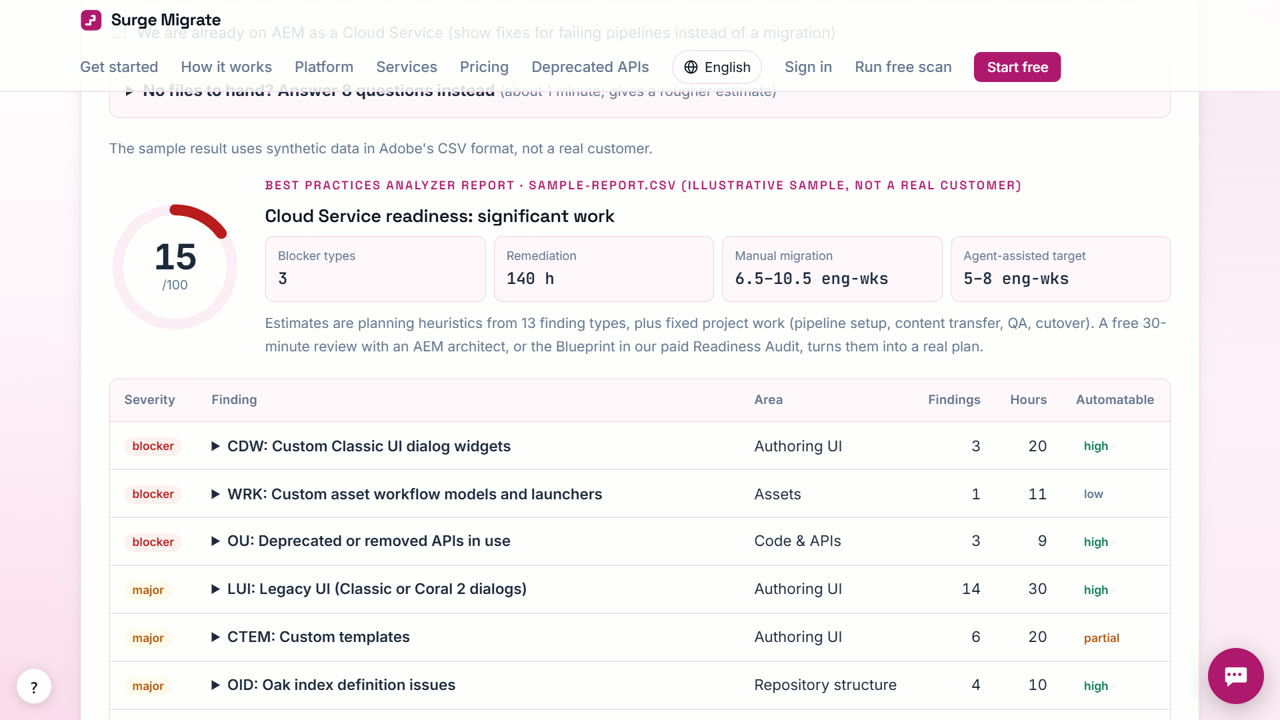
Scan
Drop your Best Practices Analyzer report or a zip of your repository on the free readiness scan. It runs in your browser and nothing is uploaded. You see every blocker with its file, line, fix and effort.
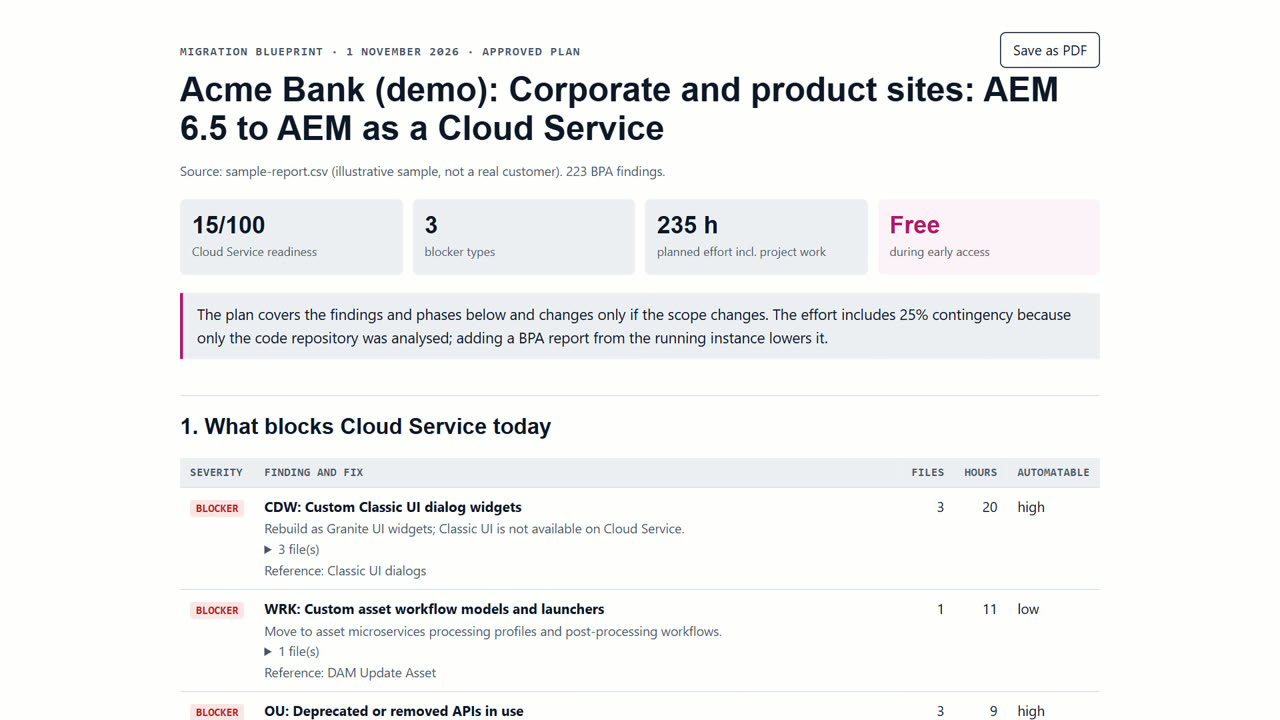
Plan
Create a free account, start a project and add the scan. A Migration Blueprint lists phases, effort, risks and the decisions your team must make. Our engineers review and approve it.
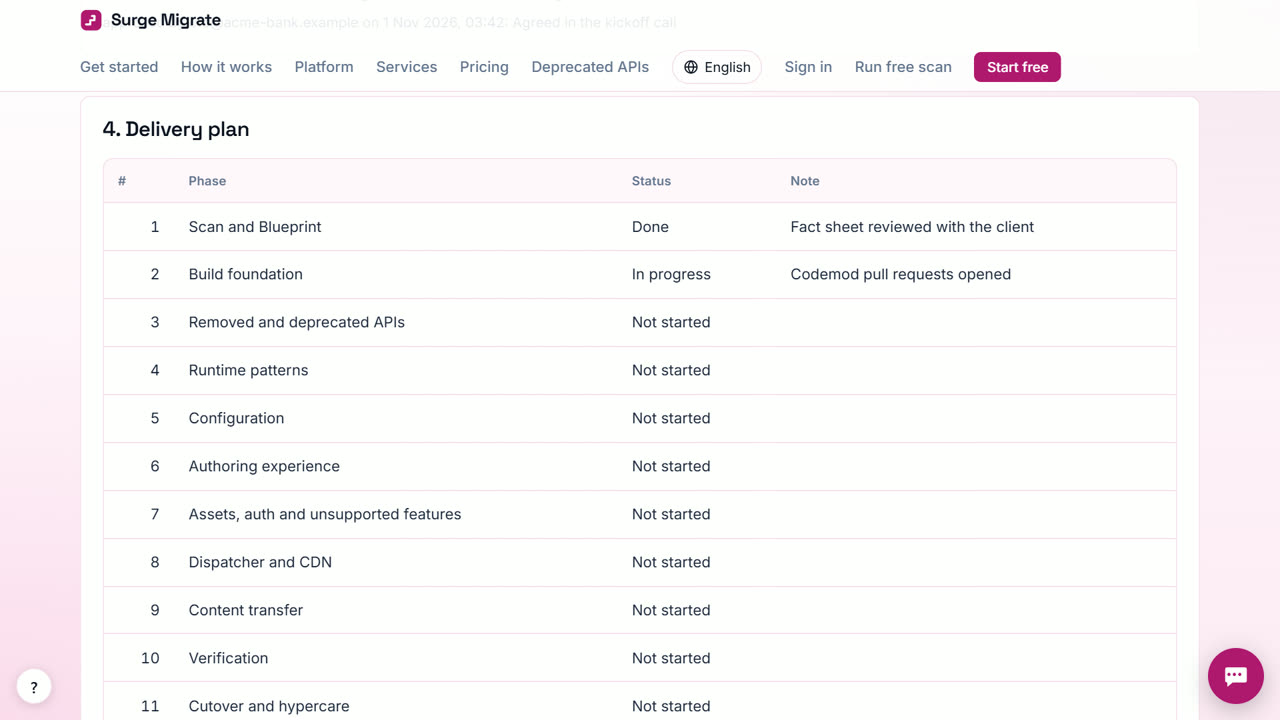
Merge
Connect GitLab, Bitbucket Cloud or Azure DevOps. Fixes arrive as small pull requests, one pattern at a time. A senior AEM engineer approves each one and your team merges.
What you get
Everything a migration needs, from first scan to last pull request
Readiness scan
33 code rules and 31 BPA pattern codes find what blocks Cloud Service, with file, line, fix and effort. Runs in your browser.
Automatic fixes without AI
5 exact rewrites (Log4j 1 to SLF4J, Commons Lang 2 to 3, OSGi configs, CQ XSS, CQ Workflow), each as its own pull request.
Private AI for the hard parts
Changes that need judgement are drafted on our own AI server, never a third-party AI service, and checked before an engineer sees them.
Migration Blueprint
Phases, effort, risks and decisions you can take to budget holders. Open it, save it as PDF, or publish it to Confluence.
Client portal and audit trail
Scans, decisions, pull requests and phases in one place, with a tamper-evident log of every step you can export.
Repository connections beta
GitLab, Bitbucket Cloud and Azure DevOps with an access token. GitHub is being set up.
Jira, Confluence, Slack, Teams, SSO beta
Export findings to Jira, publish the plan to Confluence, get notifications, sign in with Okta or Entra ID.
Deprecation Watch beta
After go-live, your repository is re-scanned and new uses of APIs Adobe is removing are flagged before a build fails.
Beta: built and tested, not yet used live by a client.
Pricing
Free for your first 3 months. Then pay only for what you use, at our cost — no markup. Monthly plans coming soon.
The readiness scan is always free. The AEM Readiness Audit is a fixed-price service: US$2,500 for the first 2 audits, then US$4,900.
Compared
Surge Migrate compared with a large systems integrator
| Surge Migrate | A large systems integrator | |
|---|---|---|
| Price | Free for 3 months, then at cost (scan always free) | Typically time and materials |
| Who does the work | Agents for repetitive changes, senior AEM engineers review | Large delivery teams |
| Blockers counted before work starts | Yes, with file and line for each | Varies by accelerator |
| Every change approved by a named engineer | Yes | Depends on your contract |
| Where your code goes | Only our own AI servers, unless you agree in writing | Depends on the vendor |
Full comparison, including when to pick a systems integrator → · All comparisons →
Questions
Common questions
Is it really free?
Yes, for your first 3 months: the portal is free for 90 days from the day you create your workspace, with everything unlocked and no cap. The readiness scan in your browser is always free.
What happens after 3 months?
Only three actions that run on our servers start to cost money, at what they cost us: an AI summary (₹1), a server scan of a connected repository with its fix pull requests (₹3) and a server-made PDF (₹0.50). You pay from a wallet you top up yourself. Everything else stays free.
Do I need a card?
No. You sign up with your work email only, and nothing is charged unless you choose to top up.
Is my data safe?
The scan reads your files in your browser and uploads nothing. Client code that our AI works on goes only to models on servers we operate, never to a third-party AI service unless you agree in writing. Every step is recorded in a tamper-evident audit trail.
Who is behind Surge Migrate?
Surge Software Solutions, an IT services firm in Bengaluru with an Adobe Experience Cloud practice, founded in 2018 by Venu Gopal Reddy Muvva, who worked on AEM at Adobe and as an architect at IBM.
Can I talk to a person?
Yes. Ask the assistant (bottom right); if it can't answer, leave your email and the founder replies, usually within 10 hours. After a scan you can also book a free 30-minute review with a senior AEM architect.
Who reviews the changes?
A senior AEM engineer approves every pull request before it reaches you. Pull requests land in your own repository, and your team merges.
How is this different from Adobe's free migration tools?
We use them. Best Practices Analyzer and Adobe's migration tooling fix individual patterns; we add estate-wide fact collection, a reviewed plan, pull requests per pattern and an audit trail for the whole migration.
Does it work with GitHub?
Not yet. The Surge GitHub App is being set up. Meanwhile upload a repository zip, or connect GitLab, Bitbucket Cloud or Azure DevOps.
See what your migration involves
Create your free account and add a scan, or press “Try with an example” to see a Blueprint in under two minutes.
Questions? Ask our assistant (bottom right) — it answers 24/7.
Popular: Migrate AEM 6.5 to AEM as a Cloud Service · Check whether your AEM 6.5 code is ready for Cloud Service · Estimate the effort and cost of an AEM 6.5 migration · Fix Cloud Manager builds failing on removed or deprecated APIs